
Batch payments management
Batch object
Batch object is a data structure representing a payment or a collection of multiple payments grouped together for processing in a single operation. In Optum Connections even if you are submitting a single payment, it will be processed within a batch that includes only one payment.
Endpoints
| Endpoint | Action |
|---|---|
POST /payments/batch | Create a Payment Batch |
POST /payments/batch/{batchId}/add | Associate Payments with a Payment Batch |
POST /payments/batch/{batchId}/start | Start Processing a Payment Batch |
POST /payments/batch/{batchId}/release | Release a Held Payment Batch |
POST /payments/batch/{batchId}/release-partial | Partial-Release a Payment Batch |
PATCH /payments/batch/{batchId} | Modify a Payment Batch |
POST /payments/batch/{batchId}/cancel | Cancel A Payment Batch |
GET /payments/batch/{batchId} | Get Payment Batch by ID |
GET /payments/batch/{batchId}/details | Get Payment Batch Details |
GET /payments/batch | Get the Payment Batches |
Batch attributes
{
  "batchId": "D8S6FSD686S68DS6safds",
  "tenantId": "D8S6FSD686S68DS6safds",
  "clientRequestId": "D8S6FSD686S68DS6",
  "accountId": "69DF7ADD-82EF-45EA-A66E-7E421360296D",
  "subAccountId": "0260F7E2-BC18-4895-B76E-65E2B0A15C99",
  "fundingType": "PreFundedSameDay",
  "fundingRequestId": "ABC123",
  "batchStatus": "Funding",
  "expectedBatchTotal": 100,
  "expectedNumberOfPayments": 1,
  "currentBatchTotal": 100,
  "currentNumberOfPayments": 1,
  "batchCreatedDate": "2024-11-15T08:51:56.601Z"
}| Name | Type | Description |
|---|---|---|
| batchId | string | Batch unique identifier |
| tenantId | string | Tenant unique identifier |
| clientRequestId | string | Batch request unique identifier |
| accountId | string | Account unique identifier |
| subAccountId | string | Sub-account unique identifier |
| fundingType | string | Funding method assigned (refer to Funding configuration for details) |
| fundingRequestId | string | The unique request ID to use when initiating funding for the batch. |
| batchStatus | string | Current batch status (e.g. Funding) |
| expectedBatchTotal | double | Payments total amount expected |
| expectedNumberOfPayments | int64 | Expected number of payments that will be added |
| currentBatchTotal | double | Actual payments total amount |
| currentNumberOfPayments | int64 | Actual number of payments added |
| batchCreatedDate | date-time | Date and time when the batch was created |
Flow diagram
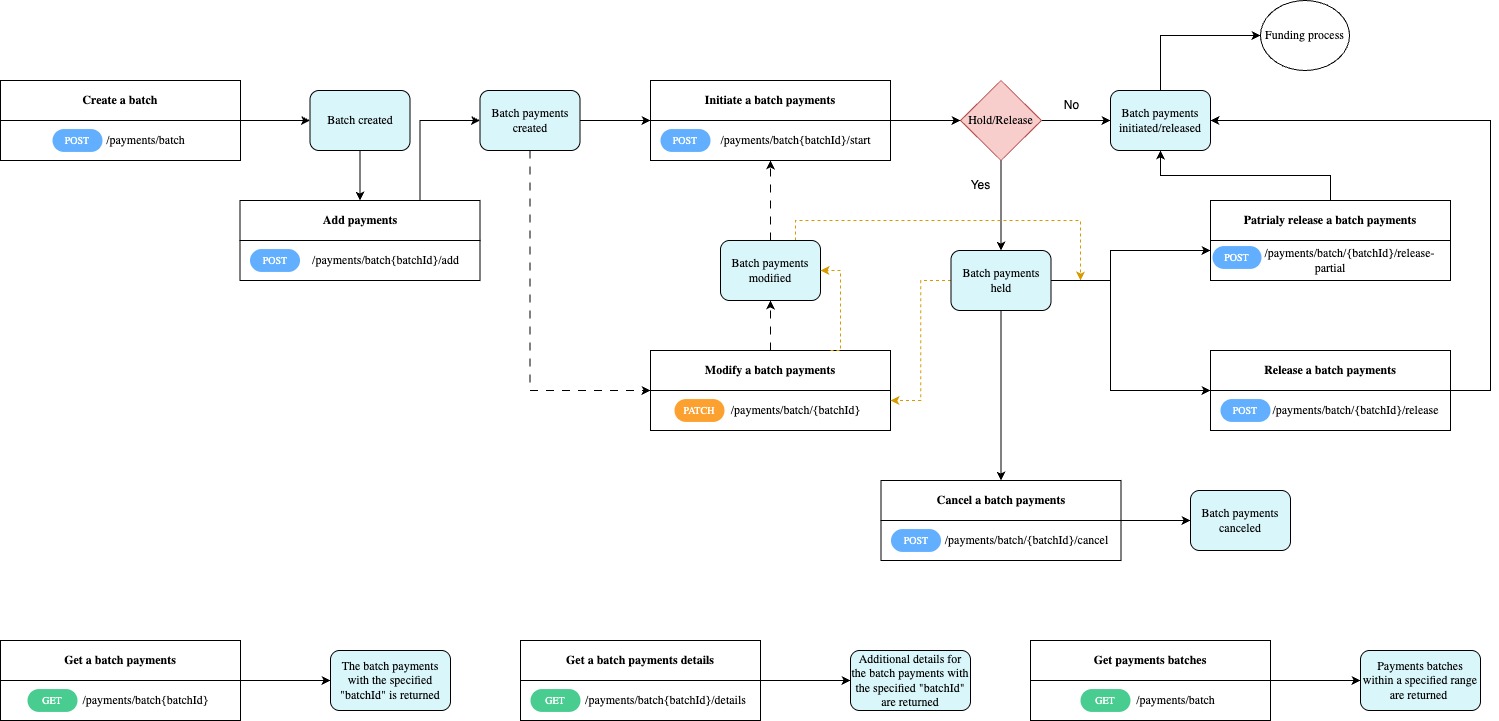
Actions
Create a Batch payments
To process multiple payments in a single operation, start by creating a batch.
Send a POST request to /payments/batch to create a batchId.
Retain thebatchIdto be used as a parameter for subsequent requests.
Associate payments with a batch
After a batch is successfully created this endpoint will allow you to grup multiple individual payments under the batch.
Send a POST request to /payments/batch/{batchId}/add.
Start processing a Batch payments
Once a payment batch was created and payments where associated, this endpoint will be called to initiate the payments batch.
Send a POST request to /payments/batch/{batchId}/start.
Calling this endpoint will:
- directly initiate the payment, if the Hold/Release configuration is set to
No. - place the payment batch in a held state, if the Hold/Release configuration is set to
Yes.
There is an additional endpoint that must be called to initiate/release a payment batch. Refer to Release a held Batch payment for details about releasing a payment batch.
Release a held Batch payments
A batch payment initiated through the /payments/batch/{batchId}/start endpoint with the Hold/Release configuration set to Yes is currently in a held state.
To initiate/release a held batch payment, send a POST request to /payments/batch/{batchId}/release. Once released, the payment batch enters to the funding process.
Batches are placed in a held state for various reasons, one of which is the requirement for additional user approval before processing can continue.
Partial-release a Batch payments
This endpoint enables the partial release of payments within a batch. It achieves this by extracting selected payments from the existing batch, generating a new batch (batchId) with the remaining payments, and subsequently initiating the release of the new batch.
Send a POST request to /payments/batch/{batchId}/release-partial.
API Reference:
Modify a Batch payments
Incorrect data entry for a created or held batch payment can be modified (updated) by sending a PATCH request to /payments/batch/{batchId}.
Batches can be modified only in Created or Held state.
Cancel a Batch payments
This endpoint allows you to cancel a batch payment. Send a POST request to /payments/batch/{batchId}/cancel.
Payments batches can be canceled only in Held status.
Get Batch payments by ID
This endpoint returns the payment batch with the specified batchId. Send a GET request to /payments/batch/{batchId}.
Get Batch payments details
This endpoint retrieves additional details for the payment batch with the specified batchId parameter. Send a GET request to /payments/batch/{batchId}/details.
Get the Batch payments
This endpoint returns all payment batches within a specified range by defining the offset and limit parameters. Send a GET request to /payments/batch.
Recipes
Updated over 1 year ago