
Fax management
Fax object
Fax object is a structured representation of a fax transaction used to manage sending, receiving, and tracking fax communication. It includes details such as sender and recipient information, the document to be faxed, transmission metadata and delivery results.
Endpoints
| Endpoint | Action |
|---|---|
POST /fax | Send a fax |
GET /fax/{faxId} | Get fax details |
DELETE /fax/{faxId} | Stop a fax |
POST /fax/search | Search faxes |
PUT /fax/{faxId}/retry | Retry a fax |
PUT /fax/{faxId}/hold | Hold a fax |
PUT /fax/{faxId}/revive | Revive a fax |
GET /fax/{faxId}/attempts | Get fax attempts |
GET /fax/{faxId}/attempts/{attemptId} | Get fax attempt details |
POST /fax/webhook/endpoints | Create webhook endpoint |
GET /fax/webhook/endpoints | Get webhook endpoint |
DELETE /fax/webhook/endpoints | Delete webhook endpoint |
Fax attributes
{
  "tenantId": "3fa85f64-5717-4562-b3fc-2c963f66afa6",
  "faxId": "3fa85f64-5717-4562-b3fc-2c963f66afa6",
  "faxStatus": "string",
  "createdOn": "2024-11-15T08:51:56.601Z",
  "updatedOn": "2024-11-15T08:51:56.601Z",
  "phoneNumber": "string",
  "failedReason": "string"
}
The following table describes fax attributes:
| Name | Type | Description |
|---|---|---|
| tenantId | string | Tenant unique identifier |
| faxId | string | Fax unique identifier |
| faxStatus | string | The status of the fax (refer to Fax management for details) |
| createdOn | date-time | Date and time when the fax was created |
| updatedOn | date-time | Date and time when the fax was updated |
| phoneNumber | string | The phone number used for fax delivery |
| failedReason | string | The reason the fax failed to be delivered |
Flow diagram
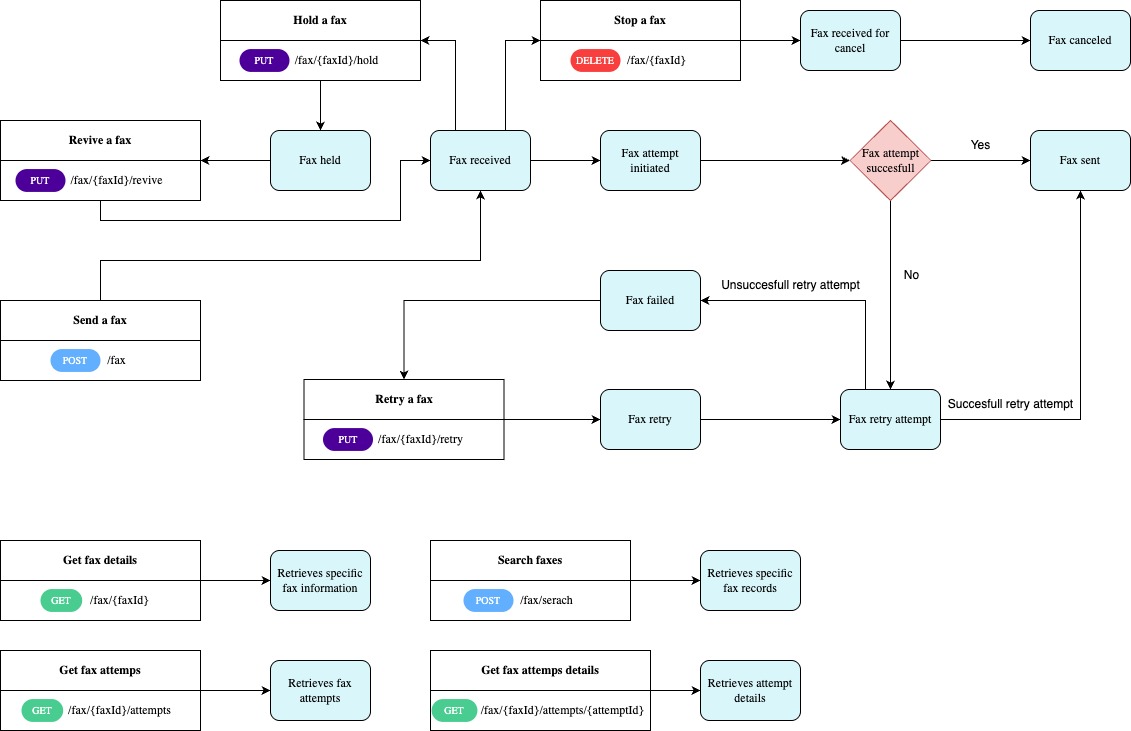
If a fax attempt is unsuccessful, the fax service will retry the transmission up to 5 times before marking the fax as failed. Once the fax is marked as failed, a Retry a fax request can be submitted; however, only one retry attempt will be made in this case.
Fax status
The following table describes the various fax statuses:
| Status | Description |
|---|---|
FaxSent | When a fax was successfully transmitted to the recipient |
FaxFailed | When a fax failed to be sent to the recipient |
FaxReceived | When a fax was successfully received by the fax service |
FaxCancelled | When a fax transmission was stopped by the requester |
FaxAttemptInitiated | When a fax transmission attempt was initiated |
FaxReceivedForCancel | When a fax stop request was received by the fax service |
FaxRetry | When a retry request for a failed fax was sent to the fax service |
FaxRetryAttempted | When a fax retry attempt was initiated by the fax service |
FaxHeld | When a hold fax request was performed successfully |
FaxWebhookUpdateFailed | When a fax event failed to be sent to the user (fax sender) |
Actions
Send a fax
Sending a fax using a multi-part request involves submitting a fax document and associated metadata to the fax service in a single API call.
To send a fax, you are required to provide the recipient fax number, include metadata in key-value pairs for tracking purposes within your system, and upload the document intended for transmission.
You can send a fax using multi-part request by sending a POST request to /fax.
Retain thefaxIdto be used as a parameter for subsequent requests.
Get fax details
Getting fax details involves retrieving information about a specific fax by sending a GET request to /fax/{faxId} and providing the faxId parameter for fax identification.
Refer to Fax management for details about fax information.
Calling this endpoint will not return a fax that was archived. To retrieve archived faxes refer to Fax management.
Stop a fax
Stopping a fax refers to the process of cancelling a fax transmission that is currently in progress. That includes transmissions with the status faxReceived. However, if the faxAttemptInitiated started or the fax has already been successfully transmitted and marked as faxSent it can no longer be canceled.
To stop a fax send a DELETE request to /fax/{faxId}, including the faxId to identify and cancel the transmission.
Search fax details
Searching faxes involves querying the fax service to retrieve specific fax records. This endpoint enables the search for current fax records and archived fax records.
To search faxes send a POST request to /fax/search and provide the following parameters:
faxNumber(optional)faxId(required): use a comma for separation when multiplefaxIds are providedfaxStatus(optional)faxSentDate(required): will retrieve all faxes sent on and after the specified dateshowFaxStatusChangeHistory: defaults to false; if set to true retrieves fax status change history.
EitherfaxIdorfaxSentDateparameters should be provided in a search request.
Retry a fax
Retrying a fax involves resending a previously failed fax transmission. This process requires the unique faxId of the original attempt and does not allow any adjustments (updates) on any fax parameters.
To retry a fax send a PUT request to /fax/{faxId}/retry.
Hold a fax
Holding a fax refers to temporarily pausing or suspending a fax transmission that was received by the fax service, and is not in the process to be sent to the recipient (fax attempt was not initiated).
To hold a fax send a PUT request to /fax/{faxId}/hold.
Revive a fax
Revive a fax refers to resending a fax that was placed on hold, allowing it to be reprocessed by the fax service for transmission.
To revive a fax send a PUT request to /fax/{faxId}/revive.
Get fax attempts
Getting fax attempts refers to retrieving the history of all attempts made to send a specific fax, including details such as the number of retries, transmission statuses, and timestamps for each attempt. This allows you to track the progress and perform troubleshooting of the fax transmission.
To get fax attempts send a GET request to /fax/{faxId}/attempts.
Get fax attempt details
Getting fax attempts refers to retrieving information about a specific attempt made to send a specific fax by providing the faxId and attemptId parameters.
To get fax attempts send a GET request to /fax/{faxId}/attempts/{attemptId}.
Create webhook endpoint
Webhooks allow you to receive real-time notifications from fax service about specific fax-related events. This enables your application to automatically handle updates about the status of a fax, without the need for constant polling.
To create an webhook endpoint send a POST request to /fax/webhook/endpoints.
Refer to Webhooks for details about webhooks management.
Get webhook endpoint
This endpoint allows you to retrieve information about fax webhooks that have been set up within your system.
To retrieve webhook details send a GET request to /fax/webhook/endpoints.
Delete webhook endpoint
Deleting webhook endpoint refers to removing an existing fax webhook from your system. This endpoint allows you to stop receiving fax related events.
To delete webhook endpoint send a DELETE request to /fax/webhook/endpoints.
Recipes
Updated 9 months ago