
Single payment management
Payment object
Payment object refers to a structured representation of payment-related data used to facilitate, manage and record payment transactions.
Endpoints
| Endpoint | Action |
|---|---|
POST /payments | Issue a Payment |
POST /payments/{paymentId}/release | Release a Payment |
POST /payments/{paymentId}/void | Void a Payment |
POST /payments/{paymentId}/reissue | Reissue a Payment |
GET /payments/{paymentId} | Retrieve a Payment |
GET /payments/{paymentId}/details | Get Payment Details |
Payment attributes
{
  "paymentId": "48dc532ac1f63a9616b719de0a6a19a5",
  "tenantId": "a976ced5-28ea-4e08-a267-024d2751e591",
  "issuerReferenceId": "EVRYHEALTH001",
  "amount": 100,
  "status": "Created",
  "version": 1
}| Name | Type | Description |
|---|---|---|
| paymentId | string | Payment unique identifier |
| tenantId | string | Tenant unique identifier |
| issuerReferenceId | string | Unique identifier to track or reference a payment. |
| amount | int64 | Payment amount (USD) |
| status | string | The status of the payment (e.g. Created) |
| version | int64 | The version of the API being used |
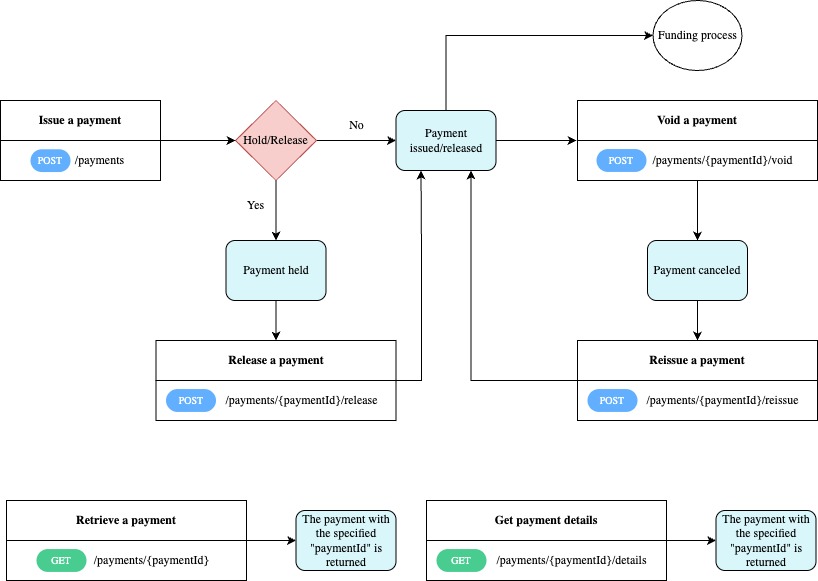
Flow diagram
Actions
Issue a payment
You can directly issue a payment by sending a POST request to /payments .
Calling this endpoint will create and directly issue the payment, if the Hold/Release configuration is set to No.
If the Hold/Release configuration is set to Yes there is an additional endpoint that must be called to release the payment. Refer to Release a payment for details about Releasing a Payment.
Release a payment
If the Hold/Release configuration is set to Yes, a payment that was created will not be issued and will remain in a held state.
To issue (release) the payment, send a POST request to /payments/{paymentId}/release.
Payments are placed in a held state for various reasons, one of which is the requirement for additional user approval before processing can continue.
Void a payment
Voiding refers to the process of canceling a payment before it is fully processed or settled.
To void a payment, POST on /api/issue/v1/payments/{paymentId}/void.
A payment can be voided if the available balance on the payment is > $0, and the payment is in one of the following statuses:
- Loading
- DocumentsGenerating
- RemittanceRequested
- DocumentsDistributing
- DistributionAssigned
- Completed
- Requested
- Sent
- Reissuing
Reissue a payment
You can reissue a payment by sending a POST request to /api/issue/v1/payments/{paymentId}/reissue.
A payment can be reissued if it was perviously voided. Refer to Voiding a Payment for details.
API Reference: No API Reference
Retrieve a payment
This endpoint returns the payment with the specified paymentId. Send a GET request to /payments/{paymentId}.
Get payment details
This endpoint retrieves additional details for the payment with the specified paymentId parameter. Send a GET request to /payments/{paymentId}/details.
Recipes
Updated over 1 year ago